A shared itinerary
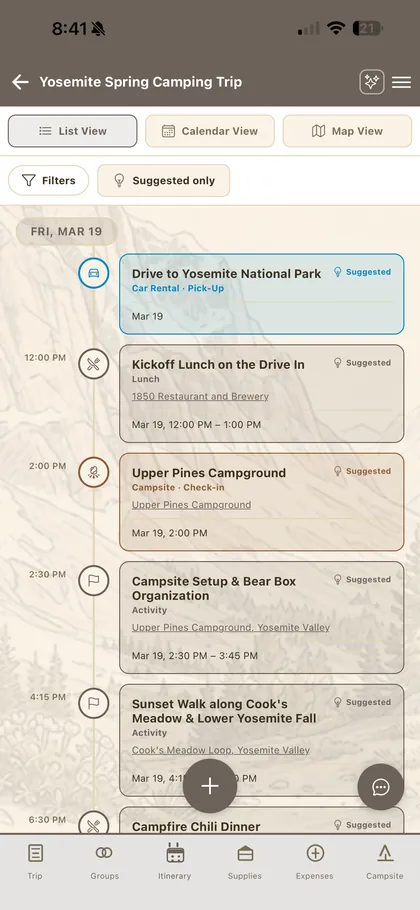
Lay the trip out day by day in list, calendar or map view. Add meals, activities and drives with times and locations everyone can see — and track exactly who's coming to each one.

FlockTrot gives your whole crew one shared place for the itinerary, the supplies, the campsite and the costs — so nobody's scrolling back through group texts to find out who's bringing the tent.
Free, no subscription, no ads — and your trips work offline at the campground.
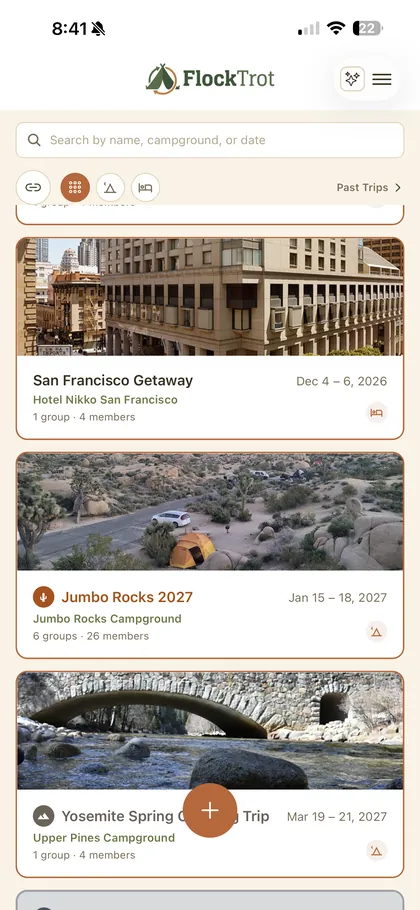
Every part of a group camping trip that normally gets lost in a thread — the plan, the packing, the money — has a home in FlockTrot.
Lay the trip out day by day in list, calendar or map view. Add meals, activities and drives with times and locations everyone can see — and track exactly who's coming to each one.
Describe the trip in plain language and FlockTrot drafts a day-by-day plan — where to stay, how you're getting there, meals and activities — for your group to review and adjust.
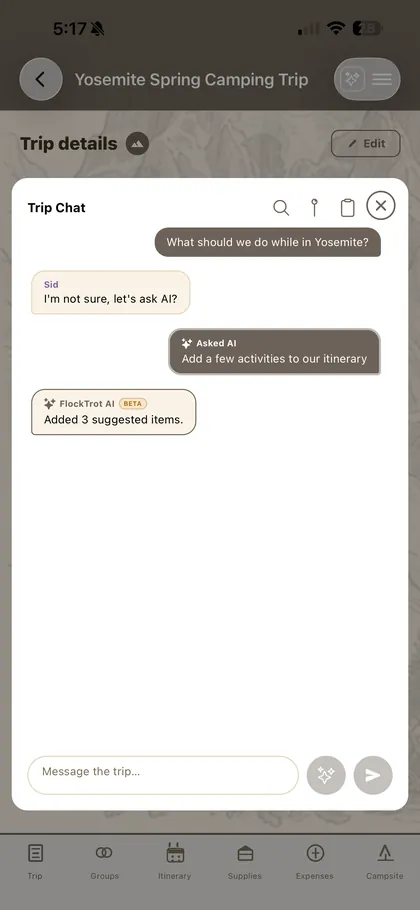
Every trip gets its own chat. Highlight any message and turn it straight into an itinerary item, a supply someone's bringing, or a shared expense — no retyping.
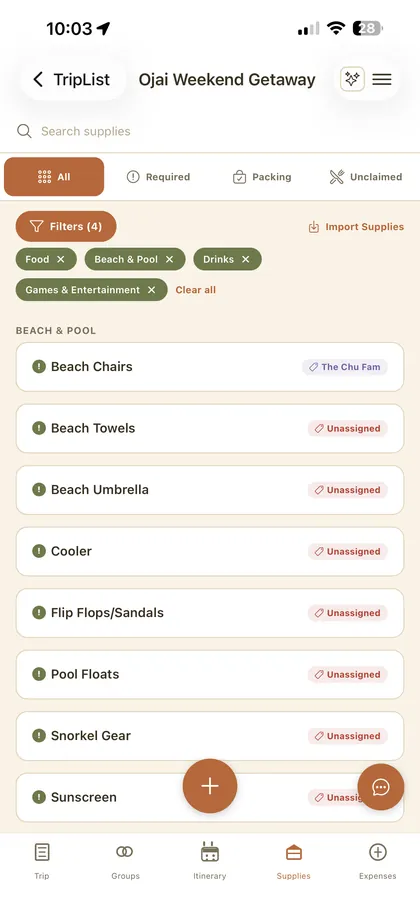
Keep one running list of what the trip needs, tag items to the group bringing them, and claim meals — so you end up with one cooler, not four, and somebody actually brings the stove.
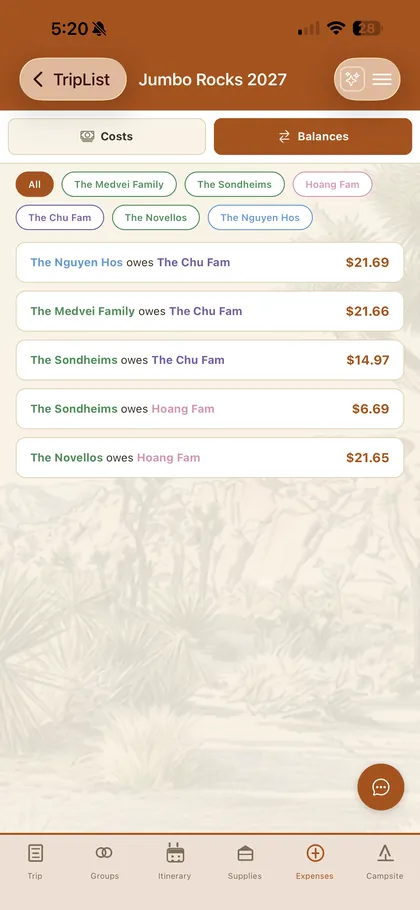
Log the campsite fee, the firewood, the grocery run. Split each cost however makes sense, then see exactly who owes who when it's time to settle up.
Save the campground address, a map and photos in the trip, and see who's claimed which site if your group is spread across several — so late arrivals can actually find you.
Not a checklist app with people bolted on — a shared trip everyone edits.
The hardest part of a group trip is the blank page. Tell FlockTrot where you're going and for how long, and it drafts a full day-by-day itinerary — transport, a place to stay, meals and activities — so your group starts from something real instead of an empty thread.
Some people want the day as a tidy list. Some want to see the gaps on a calendar. Some just want to know how far the trailhead is from the site. The same itinerary renders three ways, so nobody has to plan in a format that doesn't fit their head.
A shared supplies list the whole trip can see and claim from, with filters for what's still unassigned. Save your own go-to camping gear once as a personal list, and pull it into every trip after that instead of retyping the same packing list every spring.
Log what each person paid for as the trip goes — the reservation, the beer run, the firewood — and split each cost between whoever it actually covers. FlockTrot works the balances out, so the drive home doesn't end in mental arithmetic.
Name it, set the dates and the campground. Or describe the trip and let the AI builder draft the first version of the plan for you.
Send one link. Everyone who opens it joins the trip — and if they don't have FlockTrot yet, the link walks them through installing it first.
Everyone adds to the itinerary, claims supplies and meals, and logs costs. It all stays in sync — and stays readable offline once you're at the site.
FlockTrot is built around camping, but the shared plan works for any group trip.
Several families, one campground, a tradition that's outgrown a group text. Give each family its own group inside the trip, so the supplies list shows who's bringing what without collapsing into one giant undifferentiated list.
Nobody wants to be the organiser who chases everyone. A shared itinerary and an open supplies list mean people can claim what they're bringing themselves, instead of waiting to be assigned.
Not camping? Set a hotel or a rental as the stay instead of a campground. The day-by-day itinerary, the shared costs and the group chat all work the same for a road trip, a festival or a beach house.
When the group is too large for everyone to track everyone, per-event attendance shows who's actually coming to the Saturday hike, and expense splitting keeps the shared costs straight between households.
Save your gear list once and pull it into every trip after that. Trips you've already run stay in Past Trips, so next year's plan starts from what actually worked last time.
If you've never organised one, the AI trip builder gives you a realistic starting plan — meals, drive times, what a day at the site actually looks like — rather than a blank itinerary and a vague sense you've forgotten something.
Yes. FlockTrot is free to download and use on both iPhone and Android. There's no paid tier, no subscription and no ads.
Open the invite link the trip organiser sends you. If you already have FlockTrot installed, the link opens the invite directly. If you don't, the page walks you through installing the app first — then you're added to the trip automatically once you open FlockTrot and sign in.
Everyone who wants to see or edit the shared plan needs FlockTrot, since the itinerary, supplies and expenses all live in the app. It's free on both iPhone and Android, so nobody gets left out because of their phone.
Yes. Once you've opened a trip while you still had a connection, your itinerary, supplies list and campsite details stay available offline. Anything you change syncs back up the next time you have signal.
Yes. Log shared expenses like campsite fees, firewood or a grocery run, split each one however makes sense for that cost, and FlockTrot works out who owes who so you can settle up at the end of the trip.
Yes. FlockTrot is built around camping, but the same shared itinerary, supplies, expenses and chat work for any group trip — a road trip, a cabin weekend, a festival, a family reunion or a beach house. You can set a hotel or rental as the stay instead of a campground.
Yes. A trip can hold several groups — each family or friend group gets its own group inside the trip, with one shared view of the itinerary and who's bringing what. It's built for the multi-family trip that's outgrown a single list.
In the app: Menu → Camper Profile → Delete Account. See our account deletion page for details on exactly what's removed.
Free on iPhone and Android. Start a trip, send one link, and let your group fill in the rest.
We read every message.
Email flocktrot@gmail.com — we typically reply within a few days.
Email us at flocktrot@gmail.com with what you were doing and what happened — screenshots help a lot. In the app, Menu → Help also has tutorials and FAQs.